
To view your events, start by managing your group.
Open Events along the left.

There are three lists of events: Upcoming, Past Events, and Drafts, for events that have not yet been completed, or were submitted by non-officers.
Any event list can be searched or filtered. Clicking an event’s Pin icon moves it to the top of the list for easy access.
For pre-selected events, you can click Delete at the top, or click the More icon for options to download events, or add / remove event Tags.
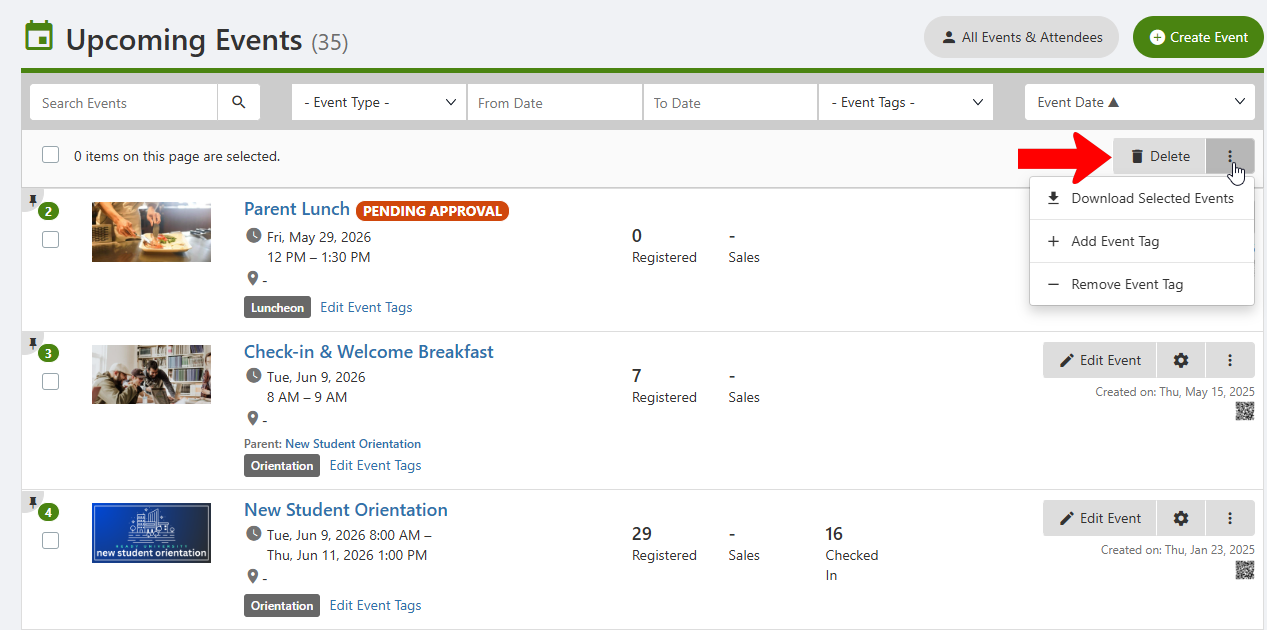
Each event is listed with its date and time, tags, number of registrations, and amount of ticket sales.

For each event, you can:
- Edit Event Tags
- Click Edit Event to change event creation Tags details. (Note that if event approval is required, making changes to an event may reset the approval process Event Approval Process.)
- Click the event name or Gear icon to manage your event Event Approval Process
Clicking an event’s More (three-dot) icon lists addition options:
- Preview the Event Page
- Copy Link for the the event page, which you can use to invite attendees Event Page
- Check in Attendees Event Page
- Duplicate the event invite attendees
- Download Attendees List Check in Attendees
- Create a To Do list
- Add event Notes
- Delete the event