
Mobile app check-in is one of several methods for checking in attendees and tracking attendance Check-In and Attendance Tracking.
With real-time updates, QR scanning, and manual check-in options, mobile app check-in helps manage attendees efficiently during live events, whether for small sessions or large-scale programs.
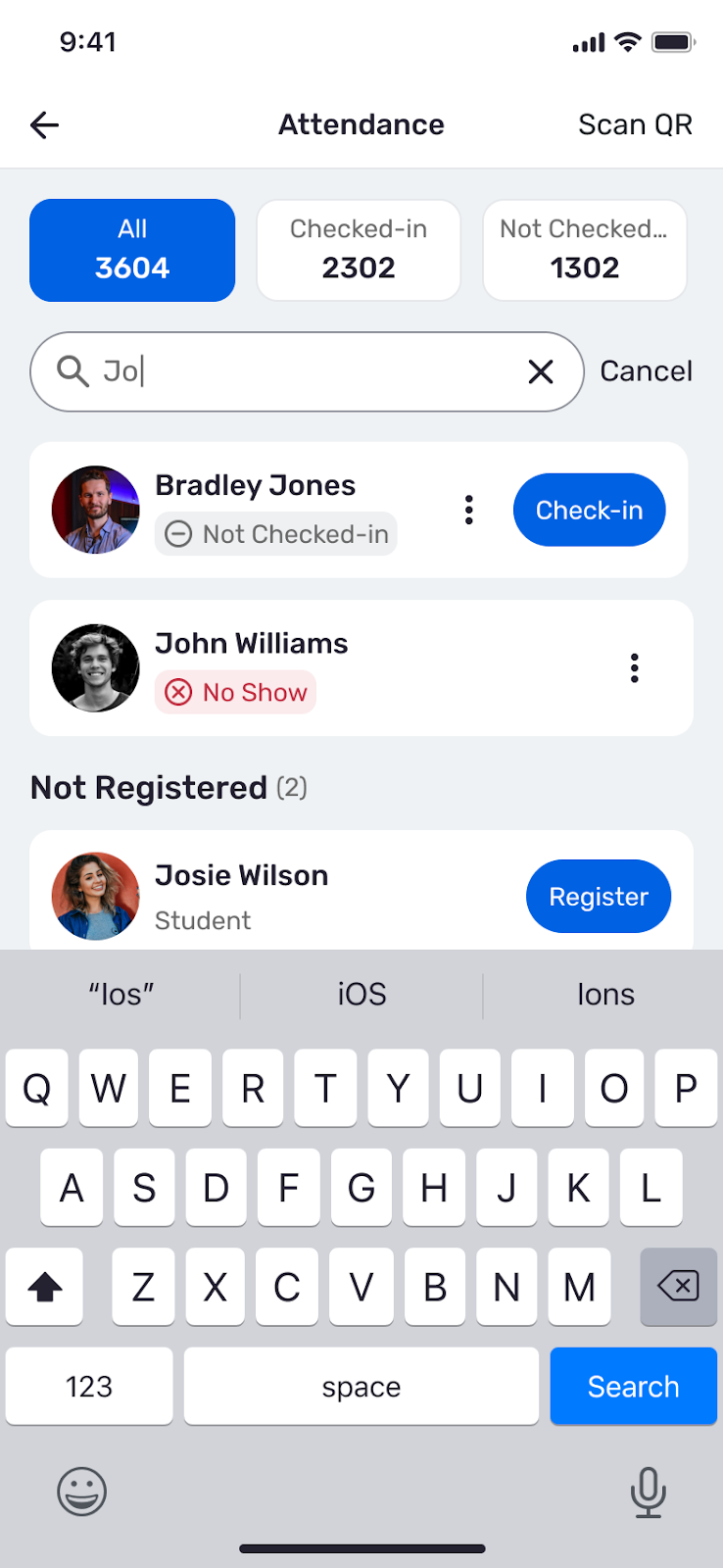
The Attendance list has a tab for all registered attendees, and tabs for those who have and have not checked in. Attendees who are not yet checked in have a Check-in button.

The search field at the top of the Attendance list can be used to locate specific attendees. If a user on this list has not yet registered, you can tap Register on the spot. This feature helps streamline check-in for large events where attendees arrive in groups or at different times
In addition to manual check-in described above, mobile check-in also has a QR scanning option.
- Tap Scan QR in the top-right corner of the Attendance List.

- Point the device camera at the attendee’s QR code.
- The app automatically updates the attendee’s status.
Possible scan outcomes include:
- Checked-In
- Invalid or Error: The QR code could not be read, or is not an event ticket nor a Digital ID.
- Already Checked-in
- Not Allowed: Check-in is not permitted. This could be because the user did not register, or because RSVP at the Door is not enabled. (This is set in the Advanced Options Creating an Event when creating the event.)
- Under 18 / Under 21: Check-in was successful but has an age warning.