
The Data Intelligence module includes your own personal AI data analyst, providing metrics, insights, and recommendations–all in one conversation.
Access / Seat Management
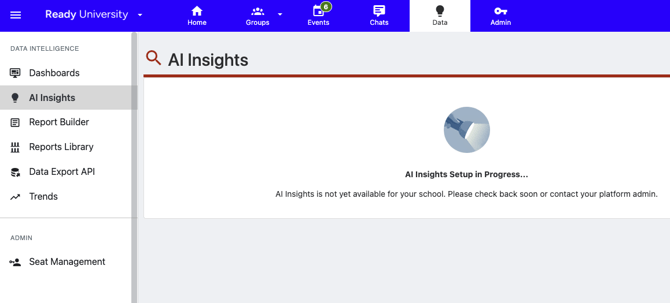
AI Insights can be found in the “Data” section, accessible from the top menu.
Once you add the Data Intelligence module to your contract and the feature is enabled in your tenant, AI Insights will be available to any user with an assigned seat.
If AI Insights has not yet been configured by the Ready Education team, you may see this message. If it has been more than 2 weeks since your contract was signed, and this has still not been configured, please contact help@readyeducation.com.
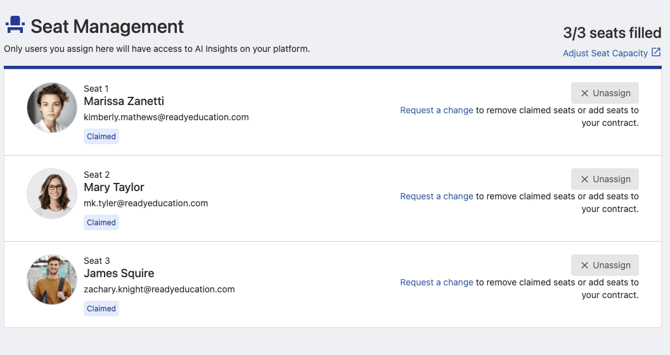
To get started, an Admin with the permission to “set permissions” can assign users to the available seats from Data (top menu) > Seat Management.
Access to AI Insights, a feature of the CampusGroups Data Intelligence module, is governed by a named-seat licensing model. Each seat must be assigned to a single, identifiable individual and may not be shared among multiple users or assigned to generic, shared, or service accounts. This does not impact access to any other Data Intelligence capability.
You can assign any user within CampusGroups. This user does not need to have an Admin role.
As soon as an assigned user loads AI Insights, their seat is “claimed.” You can unassign a user if their seat is not yet claimed. In order to unassign a claimed seat, use the “request a change” link to send this request through our team.

Permissions
There is no additional administrative permission needed, beyond an assigned seat, in order to use AI Insights. Once you have have a seat, you can access all data available to the chat agent. Access cannot be limited to only a subset of data, users, or groups.
Privacy
Your data never trains a shared model and is never shared across clients — full data isolation guaranteed.
AI Insights draws only from the walled garden of your own data, so every conversation is grounded in what's actually happening at your institution. The AI has been given the context necessary to interpret your questions based on the underlying business logic and data model within the CampusGroups platform.
Ready Education does not create nor train LLM models, but instead relies on production-ready models provided by trusted vendors. Your data is not shared outside of the secure and siloed data lake. Row-level security and strict permissioning means Admins from other schools are not able to view data from any tenant but their own. We are only exposing information to you could already find by accessing the information directly within the platform.
If you choose to submit feedback using the “thumbs down” icon, your prompt and corresponding response will be sent to AWS to help them refine the underlying analysis layer. If your conversation transcript includes sensitive information, you can send your feedback directly to Ready Education instead by contacting your Client Success Manager or submitting a support ticket.
Limitations for Canadian Clients:
AI Insights is not currently available to schools hosted in the Canadian region. This is due to AWS not yet deploying the inference infrastructure in their Canadian region (ca-central-1), which is required to implement this chat feature in CampusGroups.
Tips & Tricks
Reset the context window
If you see a red sentence in the thought process, this could mean the context window has become too large. Use the “new conversation” link to start over and ask your question again.

Start a new conversation
When you ask follow-up questions, the chat agent is starting from the results of the previous prompts. If you are asking a different question, and need the agent to look at a larger set of data, use the “new conversation” link.