A large event that contains multiple sub-events can be set up as a parent event that contains child events.
The parent event acts as a central hub, provides a comprehensive agenda, and enables attendees to register for each event individually.
Note: When creating an Event Hub Creating an Event, all sessions Creating an Event in that hub become child events of the main hub event (the parent event). In addition, if a new or existing event is made a child event of the main hub event (the parent), that child event automatically becomes a hub session.
A parent event is created as any other event Creating an Event. Set the start and end dates to span the entire duration of all child events.
In this example, the Spring Culture Fair is a multi-day event which will include the three performance events below.

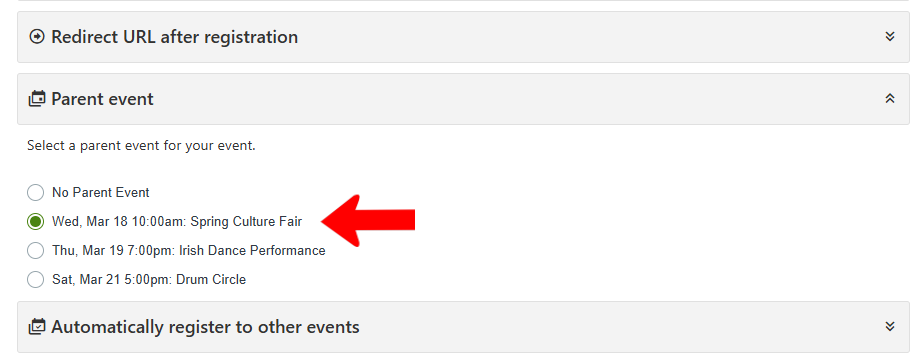
To establish the parent-child relationship, edit each child event (or do this when the event is created) and scroll to the Advanced Settings. Open Parent event and assign that role to the Spring Cultural Fair.
In the Events list, each child event is listed with its parent event.

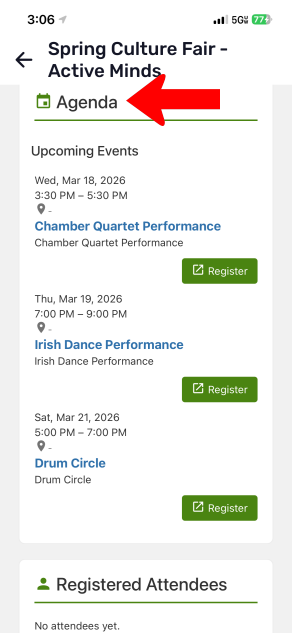
In the Event Page for the parent event, child events are listed in the Agenda, each with its own Register button.

On the mobile app, the agenda can be viewed after tapping Register.

Scroll down past the parent event registration to see child event registration buttons.